Your classroom online, made for you. Free.
Plan in minutes. Teach with calm. Take care of yourself too.
Nova, your AI teaching assistant, gets your lesson ready in minutes. Plus: 24 AI tools to plan, assess and communicate, a 22-tool class kit to project, calendar, family corner and a well-being space designed for you.
Create my free account- No credit card
- No passwords: 6-digit code to your email
- Your work stays saved


The campus
Discover everything the IA Teachers campus has for you
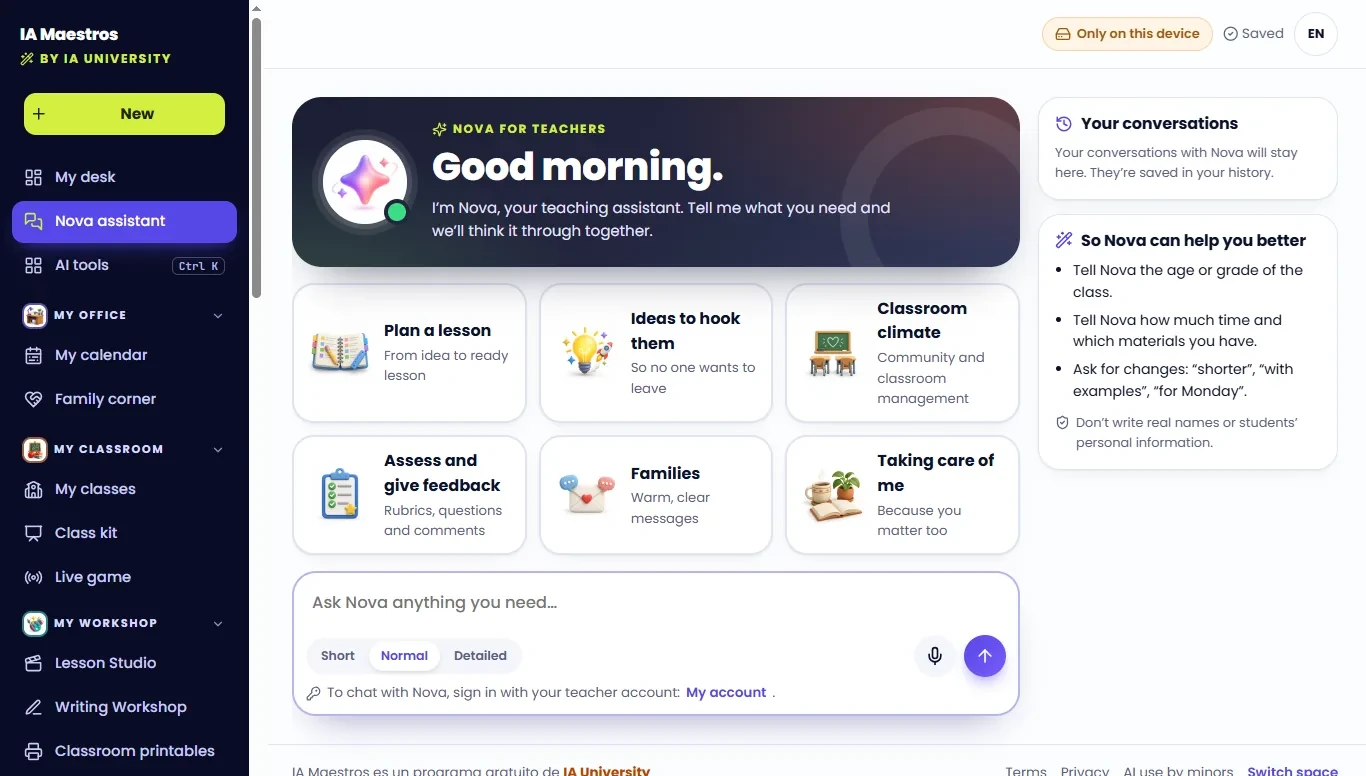
Tell Nova what you need. It gets it ready.
Nova understands your classroom: your students' age, the time you have and the materials on hand. Ask for a lesson, a worksheet, an announcement or a rubric and get a draft in seconds. You decide what stays.
Try it today
Six things Nova does for you
Plan a lesson
From idea to ready lesson.
Ideas to hook them
So no one wants to leave.
Classroom climate
Community and classroom management.
Assess and give feedback
Rubrics, questions and comments.
Families
Warm, clear messages.
Taking care of me
Because you matter too.
So Nova can help you better
- Tell Nova the age or grade of the class.
- Tell Nova how much time and which materials you have.
- Ask for changes: “shorter”, “with examples”, “for Monday”.
Nova reminds you: don't write real names or students' personal information.
24 tools that create for you
Plan, assess, differentiate, communicate and create with AI. Type the topic and grade, and get classroom-ready material back.
Plan
Lessons, units and objectives ready in minutes.
Lesson plan
A complete lesson with stages and timing, differentiation in 3 levels and assessment.
Unit planner
Week-by-week calendar, diagnostic, formative and summative assessment, and a final project.
Learning objectives
Measurable objectives with Bloom's level, success criteria and “I can…” statements.
Ideas to hook them
Five different kinds of lesson openers, each with a 1-minute script.
Assess
Quizzes, rubrics and thoughtful feedback.
Quiz generator
Questions with per-item difficulty and an answer key that explains each distractor.
Rubric generator
Rubric as a table, a student-friendly version and a self-assessment.
Questions about a text
Literal, inferential and critical questions with evidence from the text.
Exit ticket
Three quick options and a traffic light to plan the next lesson.
Feedback on student work
“Glow and grow” comment, a suggested rewrite and a version to read aloud.
Differentiate
The same learning, tailored to every student.
Text leveler
The same text at 3 levels, with the same key ideas.
One-tap differentiationNew
Any material in 3 levels, easy read, pictograms, for Spanish or English learners, or ADHD format.
Accommodations and supports
Adjustments by lesson stage and by type, without labeling the student.
Explain it simply
One concept, 5 ways: analogy, visual, story, step by step and experiment.
Vocabulary list
Words with a friendly definition, example, translation, game and flashcards.
Communicate
Clear, warm messages for families.
Email to families
A clear, warm email, with a short version for WhatsApp.
Monthly newsletter
Highlights, dates in a table, an idea for home and a short version for social media.
Report card comments
Three versions (short, medium and detailed), balanced and specific.
Translator for families
Natural, warm translation, with key phrases in both languages.
Create with AI
Games, stories and projects that teach with AI.
Classroom game or activity
Games that teach, with rules, teams, variations and a wrap-up.
A story that teaches
A story told in scenes, with illustration ideas and questions.
AI project ideas
Projects where students create with AI, with the tools and who runs them by age.
Prompts for students
Safe, Socratic prompts that make students think, not copy.
Responsible AI lesson
A case, a dilemma to debate, an activity, rules and a mini quiz.
Nova for teachers
Ask whatever you need: ideas, questions or materials.
Set up your class once. Add its grade and age, and every tool takes it into account.
You always review. Don't write real names or students' personal data, and review content before using it in class.
Your desk
Sign in and see your whole day at a glance
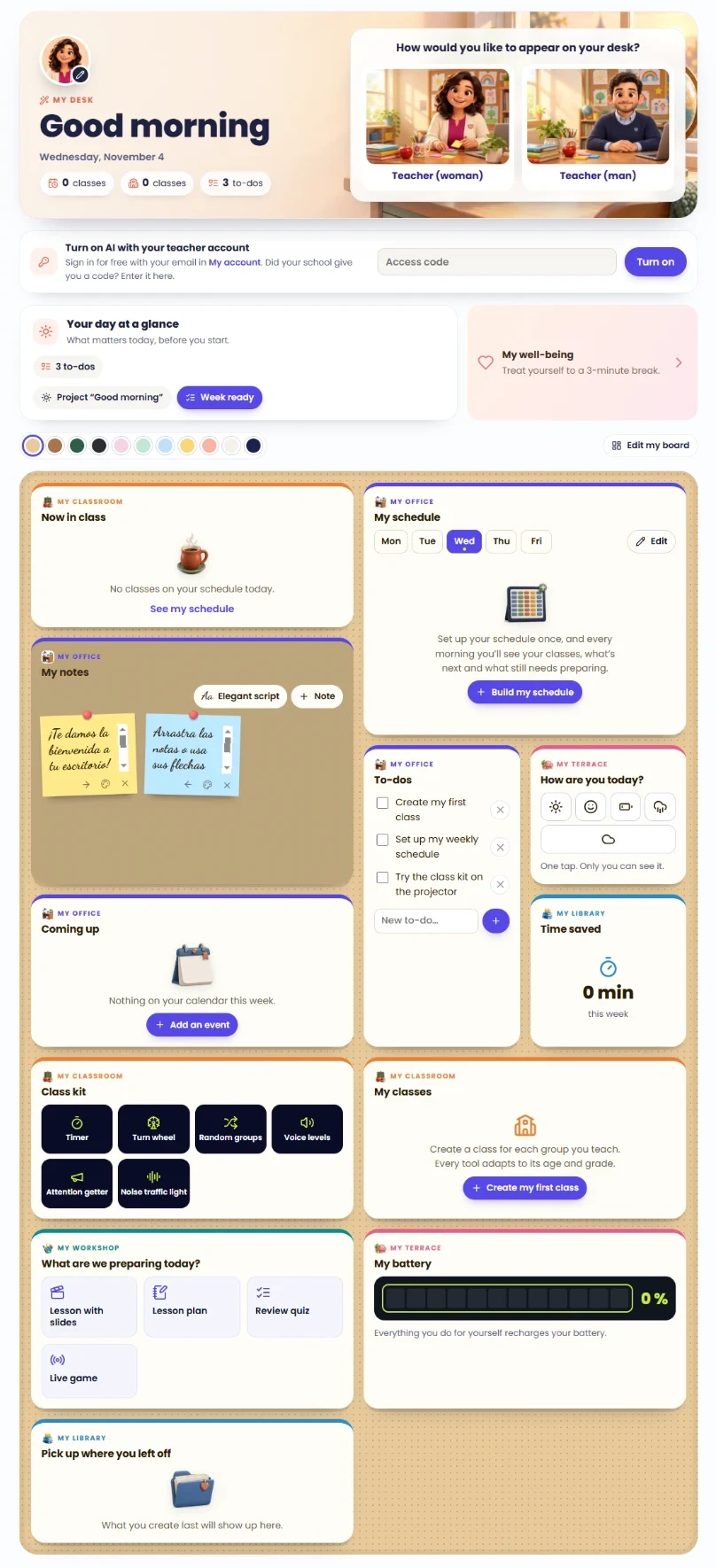
A board that greets you with “Good morning”, shows your classes, groups and to-dos, and that you can arrange and color your way. Choose how you appear: teacher (woman) or teacher (man).
Your day at a glance
Today's classes, groups and to-dos, plus a button to project “Good morning”.
Turn on AI
Free with your email, or with the access code your school gave you.
My well-being
Treat yourself to a 3-minute break whenever you need it.
Now in class
The class you're teaching right now, based on your schedule.
My schedule
Set up your week once and every morning you'll see what's next and what still needs preparing.
My notes
Sticky notes you can drag, color and write in your favorite handwriting.
To-dos
Your task list for the day, with suggestions to get started.
How are you today?
Log your mood in one tap. Only you can see it.
Coming up
This week's events from your calendar.
Time saved
How many minutes AI saves you each week.
Class kit
Quick access to your favorite tools to project.
My classes
One class per group; every tool adapts to its age and grade.
What are we preparing today?
Lesson with slides, lesson plan, review quiz or live game.
My battery
Everything you do for yourself recharges your battery.
Pick up where you left off
The last thing you created, one click away.
Edit my board
Move the blocks around and pick your desk's background color.
Class kit
22 tools to project
Open, project, done. They work offline and in full screen, to energize your class with zero prep.
Time and turns
3Timer
A big countdown with an alert at the end.
Turn wheel
Wheel, sticks or cards to pick without repeats.
Random groups
Teams with mascots and roles, in a second.
Daily routines
4Good morning
Put it up as kids arrive: date, schedule and question of the day.
Today's schedule
The day's schedule with pictures and what's next.
Activity steps
Step-by-step instructions, big and clear.
First and then
First this, then that: clear for everyone.
Attention and community
8Voice levels
From silent to presenting voice, in 5 levels.
Attention getter
Call-and-response phrases, with a chime.
Noise traffic light
The microphone measures the volume and alerts you.
Silence challenge
As long as it's quiet, the sloth keeps sleeping.
Team points
A team scoreboard saved per class.
Achievement jar
Fill the jar together and win a prize.
How are we arriving today?
How the group is arriving today, anonymously.
Quick vote
Quick questions with instant results.
Movement and calm
3Brain break
One minute of movement to recharge.
Let's breathe together
Guided breathing to calm the group.
Focus ambience
Calm scenes and sounds to work by.
Quick games
4Dice
One to four 3D dice for games and challenges.
Heads or tails
A coin that really flips to help you decide.
Stop! Random letter
A random letter and the game's categories.
Question of the day
Questions to talk, imagine and think.
What's included
Everything you need, in one place
Nova, your AI assistant
Tell Nova the grade, the time and the materials you have, and it prepares lessons, worksheets, announcements and rubrics. Ask for “shorter” or “for Monday” and it adjusts.
Lesson Studio
Type a topic and create with AI: slide-ready lessons, full units, printable worksheets and booklets with cover and index.
My calendar
Lesson plans, school year, week ready and even the substitute teacher guide.
My classes
Create one class per group you teach; every tool adapts to its age and grade.
Family corner
Ready-to-send announcements, in English and Spanish.
My well-being
3-minute breaks, guided breathing and a space to take care of yourself. Almost nobody else has this.
What makes it different
- It takes care of the teacher too
- Built for a real classroom
- 24 AI tools, 22 to project
- Truly bilingual
- Free, with an account that saves everything
- AI supports; the teacher decides
Your privacy, first
- Your email is never shown to other teachers.
- We never ask for your students' data.
- Nova reminds you: don't write real names or students' personal information.
- You can delete your account anytime.
- Bilingual: English and Spanish.
Share
Invite a colleague
Good things are meant to be shared. Send this ready-made message to another teacher.
“I found a free AI suite made for teachers: lesson plans, a classroom projection kit, calendar and even a well-being space. Sign up with your email, no passwords: https://kids.ia.university/en/teachers”
Frequently asked questions
We answer your questions
Is it really free?
Yes: creating an account and using the suite costs nothing.
What is Nova?
Nova is the AI teaching assistant inside IA Teachers. Tell it what you need and it suggests lessons, worksheets, announcements or rubrics; you decide what to use. It speaks English and Spanish.
Are my conversations with Nova saved?
Yes: they stay in your history so you can pick up whenever you want.
Do the tools know who my class is?
Yes: you create your class once, with its grade and age, and every AI tool takes it into account.
Do I need a school code?
No: just your email.
Is my data safe?
Your work lives in your account and you can delete it anytime. Your email is never shown to other teachers and we never ask for your students' data.
Does it work for my grade?
Yes: from preschool to high school, and daycare too.
What about the school computer?
Yes; when you leave, you can wipe your data from that device.
Does it replace the teacher?
Never: AI suggests, you decide.
Is it available in Spanish?
Yes, in English and Spanish.
IA Teachers is part of IA University. For kids and teens ages 8 to 16 and their families, there's IA Kids & Teens.